
24 User-centered content design
User-centered design places the people who will use our communication at the heart of the creation process. Rather than assuming we know what our audience needs, we research, observe, and test to ensure our data-driven stories actually serve the humans who encounter them. This chapter explores the iterative cycle of understanding users, designing for their needs, and validating that our solutions work.
24.1 The user-centered design process
Effective communication does not emerge fully formed from our minds. It develops through an iterative cycle of discovery, definition, design, prototyping, and evaluation. Each iteration brings us closer to solutions that genuinely serve our users.
The process follows a logical sequence, though in practice we often move back and forth between stages as we learn:
- Discover: Research to understand who our users are, what they need, and how they currently work with data
- Define: Synthesize research into specific user needs, articulated as personas, user stories, or jobs-to-be-done
- Design: Generate potential solutions constrained by user needs and context
- Prototype: Make ideas tangible so we can test them
- Evaluate: Assess whether our solutions work for users
- Iterate: Use what we learn to refine, then cycle back through the process
This chapter explores each stage, emphasizing practical techniques for data communication contexts. The goal is not merely to create something polished, but to create something useful—a distinction that becomes clear only when we involve users throughout the process.
24.2 Discover: Understanding your users
Before we can write a user story, we must understand who our users actually are. User research provides the foundation for everything that follows. Without research, we risk designing for ourselves rather than for the people who will actually use our communication.
24.2.1 Research methods
Different situations call for different research approaches:
Interviews reveal how users think about data, what questions they ask, and what frustrates them. A well-conducted interview explores not just what users say they want, but what they actually do. Ask about recent experiences: “Walk me through the last time you tried to understand customer retention trends. What did you do first? Where did you get stuck?”
Contextual inquiry combines observation with interview. Watch users work with data in their actual environment. Notice what tools they use, what shortcuts they take, what workarounds they have developed. The gap between how a process is supposed to work and how it actually works reveals design opportunities.
Surveys scale research across many users. Use surveys when you need quantitative data about user priorities, frequency of use, or satisfaction levels. Keep questions specific and grounded in behavior: “How often do you review the monthly sales report?” rather than “Do you like data reports?”
Analytics and logs show what users actually do, not what they say they do. If you are redesigning an existing communication, analyze usage patterns. What sections do people spend time on? Where do they drop off? What do they ignore? Behavioral data complements qualitative research by revealing actual rather than reported behavior.
24.2.2 Working with executive audiences
Chapter 3 explored three types of executives—analytics, marketing, and chief executives—each with different backgrounds and communication needs. User research helps us understand which type we are designing for and what they specifically need from our communication.
For an analytics executive, research might reveal they need technical details to verify our methods. For a marketing executive, we might learn they need implications for brand perception. For a chief executive, we might discover they need the decision framed in terms of strategic trade-offs. The specific person, not just their title, shapes what we create.
24.3 Define: Articulating user needs
Once we understand our users, we must articulate their needs in forms that guide our design. User stories provide one framework for this articulation.
As a [person in a particular role]
I want to [perform an action or find something out]
So that [I can achieve my goal of …]
As a [marketing executive]
I want to [explore associations between subscriber attributes and contextual preferences]
So that [I can improve upon our segmentation and targeting]
Or another of our working examples, the Los Angeles Dodgers:
As a [marketing executive]
I want to [understand variation in game attendence conditional on expected outcome and contextual factors like day of week, opposing team, starting pitchers, and cumulative win percentages]
So that [I can increase game attendence within constraints]
For these user stories to be valid, we would need to first research relevant marketing executives, if possible, at Citi Bike or the Dodgers, respectively. The value of this approach increases as we develop multiple actions and goals for a given user, or multiple users, each needing a tailored communication.
24.3.1 Personas: Designing for archetypes
While user stories capture specific needs, personas synthesize research into archetypal users who represent broader patterns. A persona is not a real individual but a composite that embodies the goals, behaviors, and pain points we observed across multiple research participants.
A well-developed persona includes:
- Demographics and background: Role, experience level, education, technical sophistication
- Goals: What they need to accomplish with our communication
- Pain points: What frustrates them about current solutions
- Context: When, where, and how they will encounter our communication
- Quote: A statement that captures their attitude or need in their own voice
For example, a “Campaign-Driven CMO” persona might combine insights from several marketing executives we interviewed. She has fifteen years of brand experience, an MBA, limited time for deep data analysis, and needs campaign results translated into actionable insights she can discuss with the board. She gets frustrated when analysts bury important findings in technical detail. She reviews data in morning briefings before back-to-back meetings.
Personas help us stay focused on real human needs rather than abstract requirements. When we face a design decision, we ask: “What would the Campaign-Driven CMO need here?” This discipline prevents us from adding features that serve our own interests rather than our users’ actual needs.
24.3.2 Jobs-to-be-done: Understanding context
Similarly, and alternatively, we may find that framing our communication purposes in terms of jobs work better to help us become specific. Richards provides a template here too:
When [there’s a particular situation]
I want to [perform an action or find something out]
So I can [achieve my goal of …]
Framing our research into these forms can help us to be specific in defining our purpose and audience for communicating.
24.4 Design: Generating solutions within constraints
With clear user needs defined, we turn to generating solutions. Design is inherently creative work, but in user-centered contexts, creativity operates within constraints—the needs, contexts, and limitations we discovered through research.
24.4.1 Creativity through iteration
Effective communication requires creativity. But how do we generate good ideas? Nobel-prize winner Linus Pauling suggested the path:
The best way to have a good idea is to have a lot of ideas.
This principle emerges clearly in the ceramics class experiment from Bayles and Orland (1993). Students graded on quantity produced not just more pots, but better pots. Through rapid iteration and learning from mistakes, they developed skills that the “quality” group, paralyzed by perfectionism, never acquired.
Mike Bostock, creator of d3.js and former New York Times graphics editor, applies similar logic to data visualization: “design is a search problem.” In his keynote, Bostock showed hundreds of snapshots of iterations leading to final published articles. The path to excellence runs through many attempts, not one perfect attempt. Early in the search, use methods that allow fast prototyping so you can try many things and avoid becoming too attached to any particular design.
24.4.2 Information architecture for user mental models
User-centered design requires organizing content to match how users think, not how data are structured. This is information architecture—the art of structuring and labeling content to support usability.
Consider the mental model of a marketing executive reviewing campaign performance. She does not think in terms of database tables or statistical variables. She thinks in terms of questions: “How did this campaign perform against goals?” “What drove the results?” “What should we do differently?” Our communication should organize information to answer these questions, not to display raw data fields.
Key principles for information architecture in data communication:
- Match the user’s task flow: Organize content in the sequence users need it, not in the order data were collected
- Provide appropriate granularity: Executives need summaries; analysts need details. Design pathways that let users drill from overview to specifics
- Use progressive disclosure: Reveal complexity gradually. Start with the essential insight; let interested users access supporting detail
- Create clear pathways: Navigation should be obvious. Users should always know where they are, what they can do, and how to get back
24.4.3 Accessibility and inclusive design
User-centered design must serve all users, including those with disabilities or different abilities. Inaccessible communication excludes people and reduces the impact of our work.
Visual accessibility considerations include: - Color blindness: Use color palettes distinguishable to people with various forms of color vision deficiency. Do not rely solely on color to encode information; add patterns, labels, or other redundant encodings - Low vision: Ensure sufficient contrast between text and background. Allow text scaling without breaking layouts - Screen readers: Provide text alternatives for visual elements. Structure documents with proper headings so navigation is possible without seeing the page
Cognitive accessibility requires: - Plain language: Avoid jargon unless your specific users require it. Define necessary technical terms - Chunking: Break complex information into digestible pieces. Use visual hierarchy to guide attention - Predictability: Make interactive elements behave consistently. Surprises frustrate users, especially those who process information more slowly
These principles benefit everyone. High-contrast text helps people reading on phones in sunlight. Clear language helps non-native speakers. Well-structured documents help all users navigate efficiently. Accessibility is not a special requirement for some users; it is good design for all users.
With design principles established, we move to making our ideas tangible through prototypes.
24.5 Prototype: Making ideas tangible
Prototypes are not the communication. It isn’t polished. It isn’t generally pretty. Its purpose, as Ko (2020) explains, is merely to give you, as a creator, knowledge and then be discarded:
This means that every prototype has a single reason for being: to help you make decisions. You don’t make a prototype in the hopes that you’ll turn it into the final implemented solution. You make it to acquire knowledge, and then discard it, using that knowledge to make another better prototype.
Because the purpose of a prototype is to acquire knowledge, before you make a prototype, you need to be very clear on what knowledge you want from the prototype and how you’re going to get it. That way, you can focus your prototype on specifying only the details that help you get that knowledge, leaving all of the other details to be figured out later.
With just text, we might call a prototype an outline.1 As we bring in data graphics — and especially when we layer in audience interactivity with both data graphics and its containing documents — the creation of those interactions can become more complex, take longer to implement. To save time, it can help to sketch out the layout and organization of the information and interactivity. And sometimes the fastest way to iterate though ideas is to set aside the technology, for a bit, in favor of pencil and paper (or, perhaps, any electronic equivalent like sketching software based on touch screens). Information designers Nadieh Bremer and Shirley Wu provide enlightening examples of early pencil sketches in their recent book, Bremer and Wu (2021).
Of note, with sketches, we can sometimes find use in linking them together through storyboards, commonly organized as a grid with visual and narrative elements,
as a way to communicate a larger, graphics-heavy narrative.
At some point, we shift from low-fidelity, hand-drawn prototypes to those of higher-fidelity, using some kind of layout or drawing software. Anything that would allow us to quickly draw things. Apple Keynote, perhaps. Or more specific drawing, illustration, or prototyping software like Illustrator, Sketch, Affinity Designer, Inkscape, or Figma. There is no best tool, and better tools depend on its user’s skill and speed with it, and the purpose it furthers. Of note, what serves as faster is also relative. Bremer and Wu frequently use ggplot2 and Vega-Lite to prototype interactive data graphics that are ultimately coded in the javascript library d3.js.
24.6 Evaluate: Testing with users
Evaluation determines whether our solutions actually serve users. We evaluate to catch problems early, to validate that our design decisions work, and to identify opportunities for improvement. Evaluation is not a single event but an ongoing activity throughout the design process.
Two forms of evaluation serve different purposes:
Formative evaluation occurs during design to improve the communication while we can still change it. It asks: “What is not working, and how can we fix it?” Formative methods include critique, user testing with prototypes, and think-aloud protocols. The goal is learning, not validation.
Summative evaluation occurs after implementation to assess whether the communication meets its goals. It asks: “Does this work for users in the real world?” Summative methods include A/B testing, analytics, and surveys. The goal is measuring success, not improving the current design.
Both forms are essential. Formative evaluation prevents us from launching broken communications. Summative evaluation tells us whether our efforts succeeded. Skipping formative evaluation risks embarrassing failures. Skipping summative evaluation leaves us uncertain whether we achieved our goals.
24.6.1 Expert critique
Critique brings trained eyes to our work. While users tell us whether something works, experts can tell us why it does not and suggest solutions based on established principles.
Visualization criticism is critical thinking applied to data displays. A critique is a two-way discussion: a human on each side of the communication. As Richards (2017) observes, receiving critique requires humility. She offers rules for effective critique:
- Be respectful: Everyone did their best with the knowledge they had
- Discuss content, not the creator: Critique the work, not the person
- Give constructive criticism: “That’s wrong” is unhelpful; explain why and suggest alternatives
- No one defends decisions: The goal is improvement, not justification
Effective critique establishes its purpose upfront. Review one aspect at a time—clarity, then accuracy, then persuasion. Objectivity matters: back judgments with theoretical reasoning or empirical evidence. Most importantly, offer alternative solutions. Simply identifying problems is insufficient; the critic must provide clear, implementable suggestions.
Structure your reviews globally first, then specifically. Begin with an overall assessment that places detailed comments in context. Point out both weaknesses (to prompt improvement) and strengths (to encourage revision and learning). Content creators need not apply every suggestion, but they should consider each seriously.
Brath and Banissi (2016) and Kosara et al. (2008) provide frameworks for data visualization critique. Ko (2020) and Richards (2017) guide design critique broadly. Doumont (2009) offers communication-specific guidance.
24.6.2 Usability testing
Users themselves provide the ultimate evaluation. Usability testing observes real people attempting to use our communication to accomplish real tasks. The method reveals where users struggle, what confuses them, and whether they achieve their goals.
The think-aloud protocol is the foundational usability testing technique. Provide the user with your prototype and a task: “Find out which product category had the highest growth last quarter.” Ask them to verbalize their thoughts continuously as they work. When they fall silent, prompt them: “What are you thinking now?” or “Tell me what you’re looking at.”
This narration reveals the user’s mental model. Do they look where we expected? Do they understand labels and encodings? Where do they hesitate, backtrack, or express confusion? The method exposes mismatches between our design intentions and user interpretations.
Testing protocols should be systematic:
Define tasks based on user goals. Tasks should be realistic, specific, and observable. “Explore the data” is too vague. “Find the sales figure for Q3 2023” is concrete.
Recruit representative users. Five users typically reveal 85% of usability problems. Focus on users who match your personas—not colleagues who know the domain, but actual target audience members.
Create a neutral environment. Do not guide, correct, or reassure during the test. If users struggle, observe the struggle; that is the data you need. Only intervene if they become completely stuck.
Measure what matters:
- Success rate: Did they complete the task?
- Time-on-task: How long did it take?
- Error rate: How many mistakes did they make?
- Satisfaction: How did they feel about the experience? (ask after, not during)
Debrief: After testing, ask users to reflect on their experience. What was confusing? What worked well? What would they change? This qualitative feedback complements behavioral observation.
Analyzing results: Look for patterns across users. If three of five users misinterpret a chart’s axes, the chart needs redesign, not user training. Prioritize problems by severity and frequency: problems that prevent task completion and affect multiple users demand immediate attention.
24.6.3 Empirical methods: A/B testing and analytics
For deployed communications, empirical methods measure actual user behavior at scale.
A/B testing (or randomized controlled experiments) compares two versions of a communication. Randomly assign users to see either version A (control) or version B (treatment). Measure which version better achieves your goal: higher click-through rates, longer engagement, more accurate comprehension, or whatever metric matters.
A/B testing isolates the effect of specific changes. If you modify a visualization’s color scheme, the test reveals whether the new colors improve outcomes. The method requires:
- Clear hypothesis: What do you expect to change, and why?
- Randomization: Users must be assigned to groups randomly to ensure comparison is fair
- Sufficient sample size: Small samples produce unreliable results; statistical power calculations determine how many users you need
- One variable at a time: Changing multiple elements simultaneously confounds results
- Statistical analysis: Determine whether observed differences reflect real effects or random variation
Ethical considerations matter. Users should not be deceived about experiments affecting important decisions. Avoid experiments that might cause harm—testing which version of a medical dosage guide is “better” by randomly assigning patients would be unethical.
Analytics and behavioral data complement experiments by showing what users actually do. Track metrics like: - Where users spend time - What they click, hover over, or ignore - Where they drop off or abandon tasks - Which paths they take through interactive content
Analytics reveal patterns across many users that individual testing might miss. If 70% of users never scroll past the first screen, your crucial content is invisible. If users consistently click a non-interactive element, they expect it to do something.
The combination of methods yields robust insights. Usability testing with five users reveals problems that analytics with thousands of users obscure. Analytics with thousands of users reveals patterns that five-user testing cannot detect. Expert critique applies theoretical frameworks that users lack vocabulary to articulate. Together, these methods provide comprehensive evaluation.
24.6.4 Graphical perception studies
Beyond general usability testing, a specialized tradition of graphical perception research has quantified how accurately people decode different visual encodings. This empirical foundation, pioneered by Cleveland and McGill (1984) and extended by Heer and Bostock (2010), provides evidence-based guidance for visualization design.
Cleveland and McGill’s foundational experiments asked participants to compare quantities encoded in different ways: position along a common scale, position on identical but non-aligned scales, length, angle, area, volume, curvature, and color saturation. Their findings revealed a perceptual hierarchy: we judge positions most accurately, followed by length, then angle, then area. This hierarchy explains why bar charts (position encoding) often outperform pie charts (angle encoding) for precise comparison tasks.
Heer and Bostock (2010) replicated and extended this work using crowdsourced experiments on Amazon Mechanical Turk, demonstrating that large-scale perception studies could be conducted rapidly and affordably. Their results largely confirmed Cleveland and McGill’s rankings while providing finer-grained accuracy estimates across encoding types.
Applying perception research to your evaluations:
When testing visualization comprehension, consider borrowing methods from this tradition:
- Comparison tasks: Ask participants to identify which of two marked values is larger and by what percentage. Measure accuracy (error magnitude) and response time.
- Estimation tasks: Ask participants to estimate a value shown in the visualization. Compare their estimates to actual values.
- Ranking tasks: Ask participants to rank several categories by their values. Measure how often rankings match the true order.
These task-based measures complement qualitative feedback by providing quantifiable evidence about perceptual accuracy. If users consistently misestimate values encoded as area but accurately decode the same values encoded as position, you have empirical grounds for redesign.
Tufte (2001) encouraged experimentation with visual displays, arguing that the best evidence for what works comes from systematically testing alternatives. While Tufte’s emphasis was primarily on maximizing “data-ink”—the proportion of ink devoted to data versus non-data elements—his broader point applies: claims about visualization effectiveness should be grounded in evidence, not merely convention or intuition.
For practical guidance on running your own perception experiments, consult the methodological details in Cleveland and McGill (1984) and Heer and Bostock (2010). Modern tools like jsPsych, Prolific, and Observable make such experiments increasingly accessible to practitioners, not just researchers.
24.7 Iterate: Using feedback to improve
Evaluation generates feedback. The final step is using that feedback to improve the communication, then cycling back through the process. Iteration transforms good communications into excellent ones.
Prioritizing feedback: Not all feedback requires action. Organize input by: - Severity: Problems that prevent users from achieving goals demand immediate attention. Minor cosmetic issues can wait. - Frequency: Issues affecting many users outweigh edge cases affecting few. - Alignment with goals: Feedback that moves the communication closer to its purpose deserves priority. Suggestions that serve different goals should be evaluated carefully. - Implementability: Some changes are quick wins; others require significant effort. Balance impact against cost.
Responding to critique: When experts identify problems, do not become defensive. Ask clarifying questions. Request specific suggestions. Consider whether the critique reveals a deeper issue you had not recognized. Remember that the critic wants your communication to succeed.
Responding to user testing: Users are never “wrong.” If users misunderstand your communication, the communication is unclear. If users cannot complete tasks, the design is flawed. Blame the design, not the user. Your job is to reduce the gap between your intentions and user interpretations.
Knowing when to stop: Perfection is impossible and often unnecessary. You can stop iterating when: - Users consistently achieve their goals without significant struggle - The communication meets its defined success criteria - Further improvements would require disproportionate effort for marginal gains - The cost of delay exceeds the benefit of refinement
“Good enough” communication delivered on time serves users better than perfect communication delivered late. The user-centered design process prioritizes utility over elegance, clarity over cleverness, and user success over designer satisfaction.
With each iteration, return to earlier stages as needed. New insights from evaluation might reveal user needs you missed in discovery. Testing might show your design assumptions were wrong. The process is not strictly linear; it is a spiral, with each cycle bringing you closer to solutions that genuinely serve your users.
Lee et al. (2015) provide another view into the process of telling data-driven stories, in the context of a team effort. The authors diagram steps, components, and responsibilities:
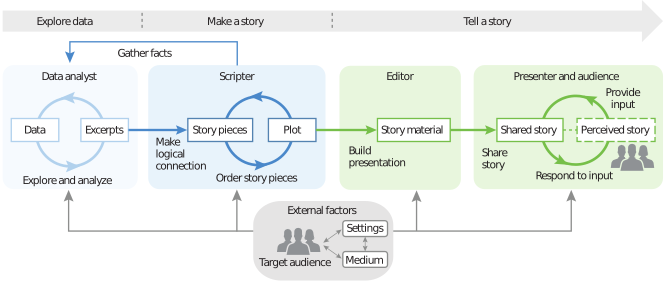
But whether we are part of a team or creating alone, we integrate numerous concepts to effectively communicate data-driven, visual narratives. The goal of this text was to introduce many of the main components shown above while providing an entry point for further discovery in whatever rabbit hole you’d like to explore within.
In closing, to paraphrase Richards (2017), storytelling with data “isn’t just a technique,” or set of techniques, “it’s a way of thinking. You’ll question everything, gather data and make informed decisions. You’ll put your audience first.”
An outline is actually a great place to begin even for data graphics and interactions.↩︎